Collections are the only genuinely organized thing most people have on Instagram.
Everything else is a river. But at some point you made a collection called "Recipes," and one called "Travel," and one called something embarrassing you'd forgotten about, and you filed things into them by hand, one at a time, over years. That's real curation. It took effort.
So it's worth knowing exactly what happens to them when you download your data — because the answer is better than you'd expect, and also worse.
The good news: they survive the export
When you request your Instagram data (Profile → ☰ → Accounts Centre → Your information and permissions → Download your information, and choose JSON), collections come through intact.
They live in saved_collections.json, and the structure is a bit odd but workable: it's one long list where a collection's name appears as a header, and then the posts filed under it follow, until the next header.
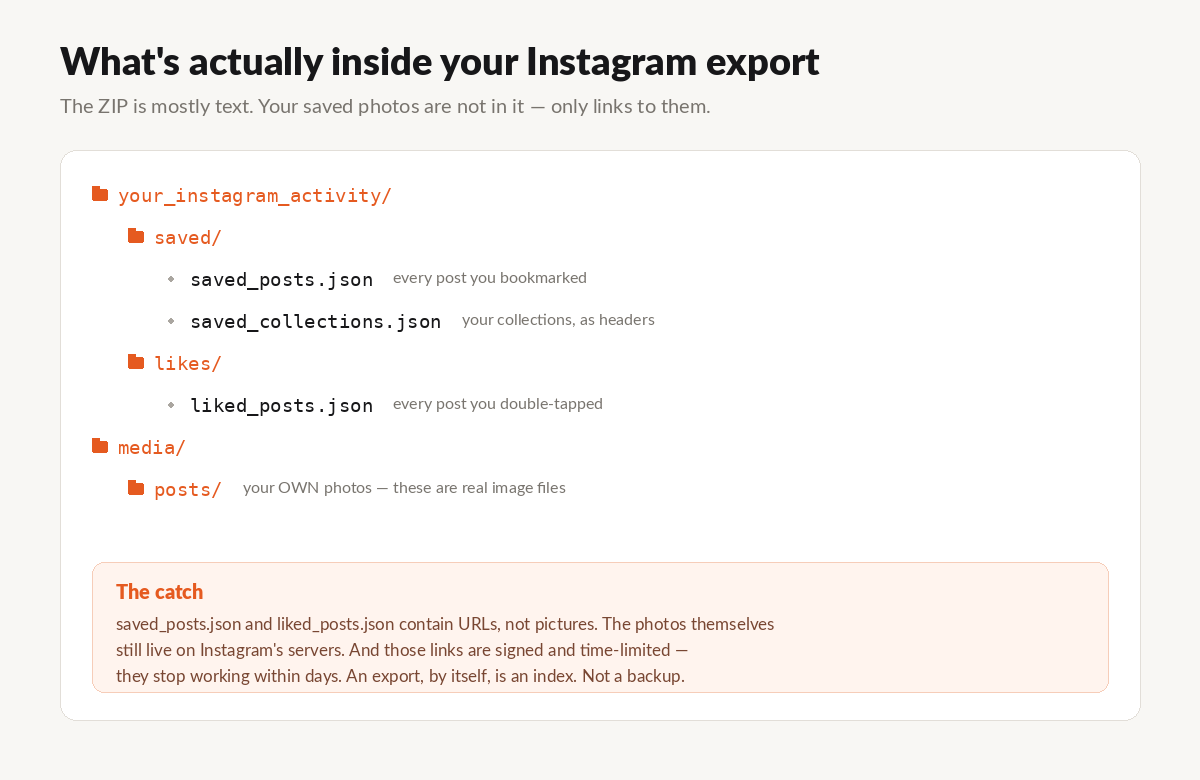
So the file knows that "Recipes" contains these 128 posts, and "Travel" contains those 94. The grouping you built survives. Instagram didn't flatten it.
That's genuinely good, and it's more than TikTok does.
The bad news: they're still just links
Here's the catch, and it's the same catch that runs through every one of these exports.
saved_collections.json contains URLs. Not pictures. The collection "Recipes" is a list of 128 links to posts that still live on Instagram's servers.
And those links are signed and time-limited — they expire within days of the export being generated.
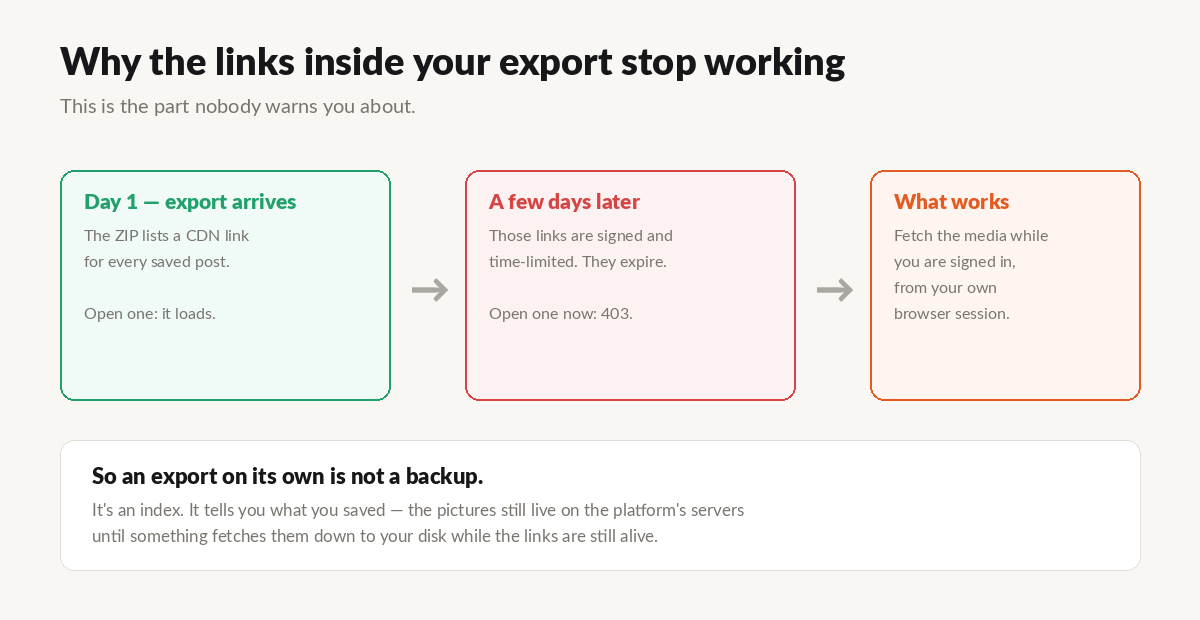
So the export preserves the shape of your collections perfectly, and preserves precisely none of the actual content. It's a beautifully organized index of things you can't see.
Why this matters more for collections than anything else
If you lose a random liked post from four years ago, you'll probably never notice.
Collections are different. A collection is a statement that you'll come back to this. That's what the folder was for. And if you finally go looking for that recipe in three years, "I have a JSON file with a dead link in it" is not a satisfying place to land.
There's also the practical dimension: dumping ten thousand saved posts into one folder is almost as useless as losing them. The value isn't just in having the files — it's in having them still sorted the way you sorted them.
Getting them back as real folders
What you want is for "Recipes" to come out the other end as a folder called Recipes with 128 actual images in it.
That's specifically what I built UnplugMe to do, because it's the part I cared about in my own archive. It reads saved_collections.json, reconstructs your collections, and downloads the actual photos and videos into folders with the names you gave them — while the links still work, using the session you're already signed into.
You can also pick and choose. If you only care about two collections out of nine, download those two.
The first 50 downloads are free, no account, so you can point it at your own export and see whether the folders come out right.
Get your collections back → · Full Instagram export guide →
Things worth knowing
Posts you saved without filing — the ones that just go to "All Posts" and never make it into a collection — are in saved_posts.json, separately. Most people have far more of these than they think. Worth grabbing too.
A post can be in more than one collection. That's fine, but it means the total across your collections can be higher than the number of distinct posts.
Deleted posts are gone. If a creator removed the post, or went private, that entry in your collection is now a permanent blank. This is the single best argument for doing this while your collections are still mostly intact — every year, a few more of them quietly rot.
Collection names come from you, which means they come out exactly as you typed them, typos and all. Mine included one called "stuff" containing 340 items, which tells you something about my filing system.
The short version
Instagram's export preserves the structure of your collections and none of the content.
To end up with actual folders full of actual pictures, something has to walk the list and fetch each post while the links are still alive. Do that, and the years of filing you did turn into a real, browsable thing on your own drive.
Don't, and you're the owner of a very well-organized list of ghosts.
UnplugMe is a personal data portability tool. It works with the official Instagram data export and your own signed-in session, and only ever downloads content you already saved yourself. It is not affiliated with Meta.