There are a hundred guides to deleting your Instagram account. Most of them are the same four screenshots.
This one has the four screenshots too. But it also covers the part the others skip, which is the part people actually write to me about afterwards: everything you saved goes with it.
Not your posts. Those you'll have somewhere. I mean the other stuff — the recipes, the workouts, the four hundred things in a collection called "Ideas," the reel from a friend who doesn't post anymore. Thousands of things you deliberately kept, that live nowhere except behind a bookmark icon in an app you're about to switch off.
So: how to do it, and what to do first.
Deactivate or delete? They're very different
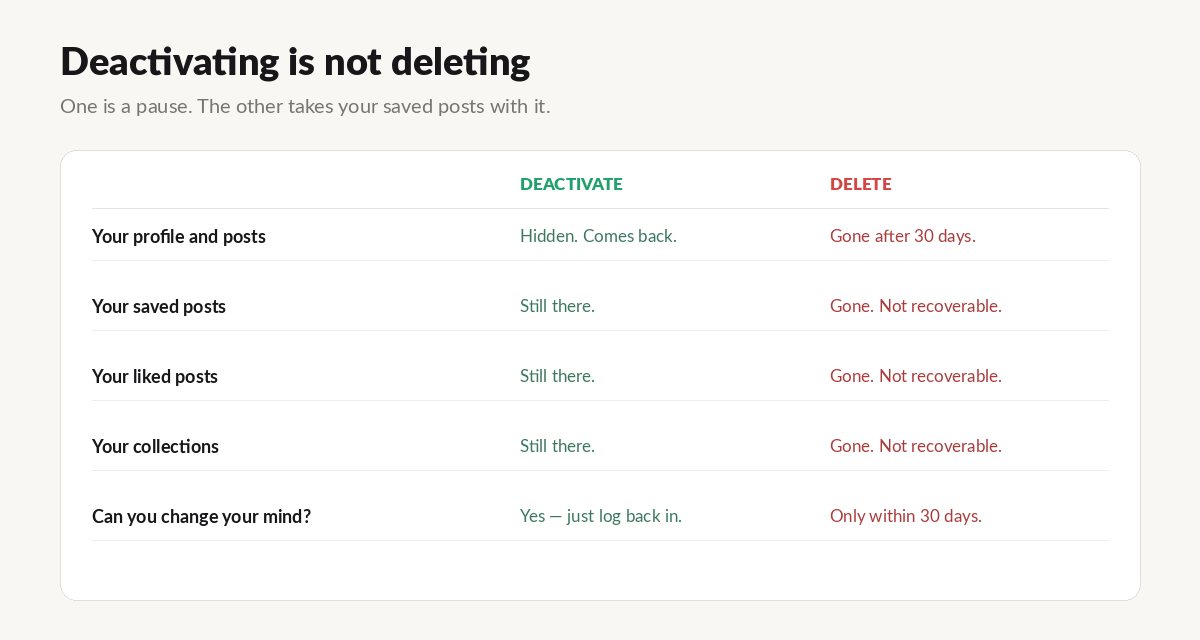
Deactivating hides your account. Your profile, photos, comments and likes are invisible to everyone else, but nothing is destroyed. Log back in and it all returns. It's a pause button, and you can press it as often as you like.
Deleting is permanent. Instagram gives you a 30-day grace period, during which logging back in cancels it. After that, it's gone — and so is everything in it.
If you're not certain, deactivate. There is no prize for making it permanent quickly, and you can always delete later. Almost everyone I know who has done this properly deactivated first.
Before you do either: get your data
This takes ninety seconds and it is the step people skip and regret.
Profile → ☰ → Accounts Centre → Your information and permissions → Download your information.
Choose JSON, not HTML. Choose all time and everything. Then request it, and wait — usually under an hour, occasionally a day or two.
Don't delete anything until the export has actually arrived and you've downloaded the ZIP. Instagram emails you a link that expires after about four days, and once your account is gone, you cannot request it again. Ever. That door closes with the account.
How to deactivate
On the app: Profile → ☰ → Accounts Centre → Personal details → Account ownership and control → Deactivation or deletion → pick your account → Deactivate account.
On the web (instagram.com): Profile → Settings → Account ownership and control → Deactivation or deletion.
You'll be asked why, and you'll re-enter your password. That's it. Your account vanishes from public view.
To come back: just log in. Everything returns, including your saves.
How to delete permanently
Same path — Accounts Centre → Personal details → Account ownership and control → Deactivation or deletion — but choose Delete account.
Instagram will ask for a reason and your password again. Then the 30-day clock starts.
During those 30 days, logging in cancels the deletion. After them, it's irreversible. Meta says it can take up to 90 days to fully clear everything from their systems, which is a detail that matters to almost nobody but is true.
What you actually lose
This is the section other guides don't write.
Your own posts, photos, videos. Gone from Instagram — but if you downloaded your data first, they're in the ZIP as real files. This part is genuinely fine.
Everything you saved. Every bookmarked post. Every collection you built. Gone, and not in the ZIP in any usable form — more on this in a second.
Everything you liked. Same story.
Your DMs. The text comes through in the export. The media inside them is patchy.
Your follower list, your comments, your story archive, your close friends list. All of it.
The part that catches everyone
You'd think the export solves this. You downloaded your data, so you have your saves, right?
No. And this is the single most misunderstood thing about Instagram data exports.
saved_posts.json and liked_posts.json don't contain pictures. They contain links — signed, time-limited URLs pointing at photos that still live on Instagram's servers. Open one the day your export arrives and it loads. Open the same link a couple of weeks later and you get a 403.
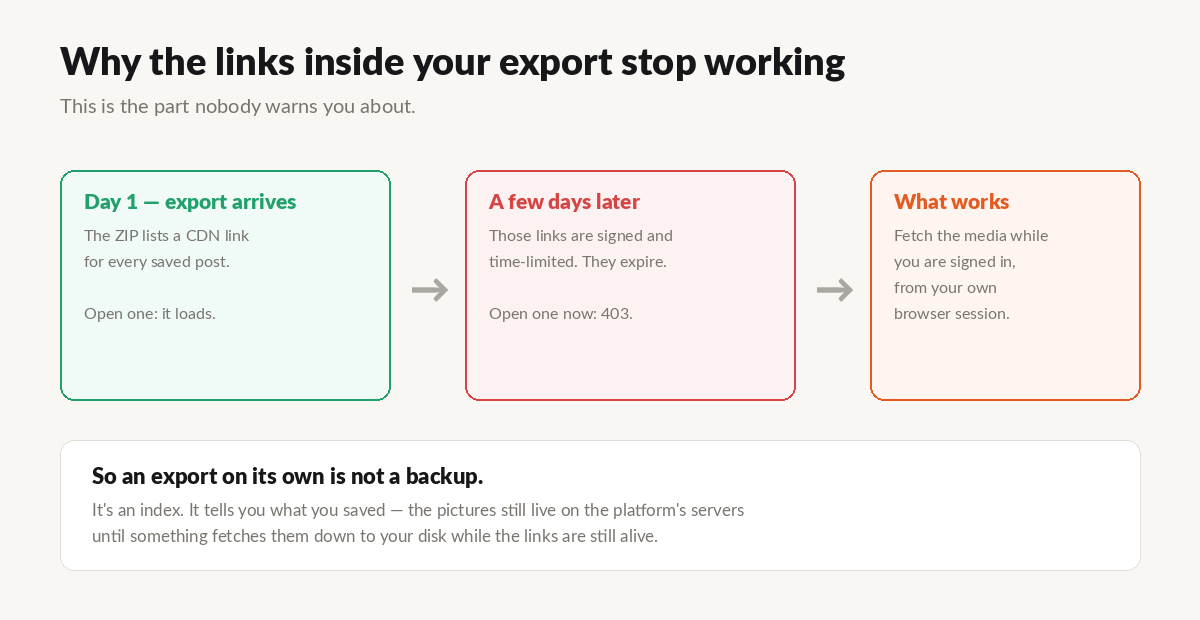
So the export is an index, not an archive. It's a complete, beautifully organized list of everything you cared about — and once the links die, that's all it is.
Delete your account with only the ZIP in hand and you'll open it a year later to find a very thorough inventory of things you can no longer see.
So do this in the middle
Between "request your data" and "delete your account," there's a step: pull the actual pictures down while you're still logged in and the links still work.
Something has to walk that list of thousands of URLs and fetch each one using the session you already have — your own browser, your own login, the same access you have right now when you open the app.
That's what I built UnplugMe to do, because I hit this exact wall myself and found out too late that my export was mostly ghosts.
You drop the ZIP in, and it downloads what you saved and liked to your hard drive — with your collections rebuilt as folders, so "Recipes" is still called "Recipes." A big archive takes a while and runs in the background. The first 50 are free with no account, so you can see if it works before deciding anything.
The order that works
- Request your data export. JSON, all time. Today, even if you're only half-sure.
- Wait for the email. Download the ZIP. The link dies in about four days.
- Pull down what you saved and liked, while you're still logged in.
- Deactivate. Not delete. Give it a month.
- Then decide. If you still want it gone in 30 days, delete it — and it'll cost you nothing you'd miss.
Most people who deactivate don't miss the feed at all. What they come back for, once, quietly, is one specific thing they'd saved. If you've done steps 1–3, that's just a folder on your computer now, and you never have to log in again to find it.
A few honest limits
Deleted posts are already gone. If a creator removed a post you saved, it's beyond anyone's reach — the platform no longer serves it. Every year you wait, a few more of your saves quietly rot.
Private accounts you followed. If they've since restricted access, those saves may not come back either.
There's no undo after 30 days. Not through support, not through a form. This is the one decision here that's actually permanent, which is precisely why the export step goes first.
UnplugMe is a personal data portability tool. It works with the official Instagram data export and your own signed-in session, and only ever downloads content you already saved or liked yourself. It is not affiliated with, endorsed by, or sponsored by Meta.