Most people who back up their Instagram aren't leaving.
They just want a copy. Because an account is a thing that can be compromised, locked, mistakenly flagged, or lost behind a forgotten password — and because thirteen years of saved things sitting exclusively on someone else's server starts to feel silly once you notice it.
This is how to get a real, complete backup onto your own drive. It doesn't require deleting anything.
What "complete" actually means
There are three different piles of stuff in an Instagram account, and they behave very differently:
Your own posts. Photos and videos you published. Easy — Instagram gives you these as real files.
Everything you saved. Bookmarked posts, sorted into collections. Hard — and the part most backup guides quietly ignore.
Everything you liked. Years of double-taps. Also hard, for the same reason.
Most "how to back up Instagram" advice covers pile one and stops. But for a lot of people, piles two and three are the ones with the actual value in them. Your own posts you've usually got. The recipe you saved in 2019 exists in exactly one place.
Step 1: request your data
Profile → ☰ → Accounts Centre → Your information and permissions → Download your information.
Choose JSON, not HTML. HTML gives you a clickable mini-website, which looks friendlier and is much harder to do anything with. JSON is structured data that a tool can actually read.
Choose all time, and everything.
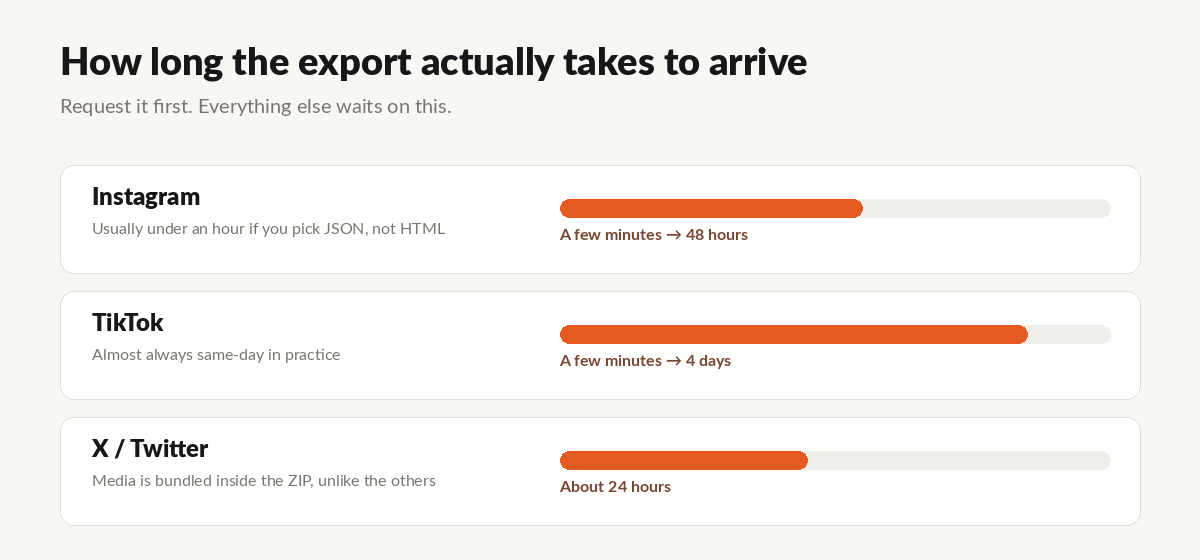
It usually arrives within an hour, sometimes a day or two. You'll get an email with a download link — and that link expires after about four days, so grab the ZIP the day it lands. The email tends to land in a promotions tab, which is how most people miss it.
Step 2: understand what you got
Unzip it and you'll find your own photos and videos, as real files, under media/. That's pile one done. Copy that folder somewhere safe.
Now look at saved_posts.json and liked_posts.json.
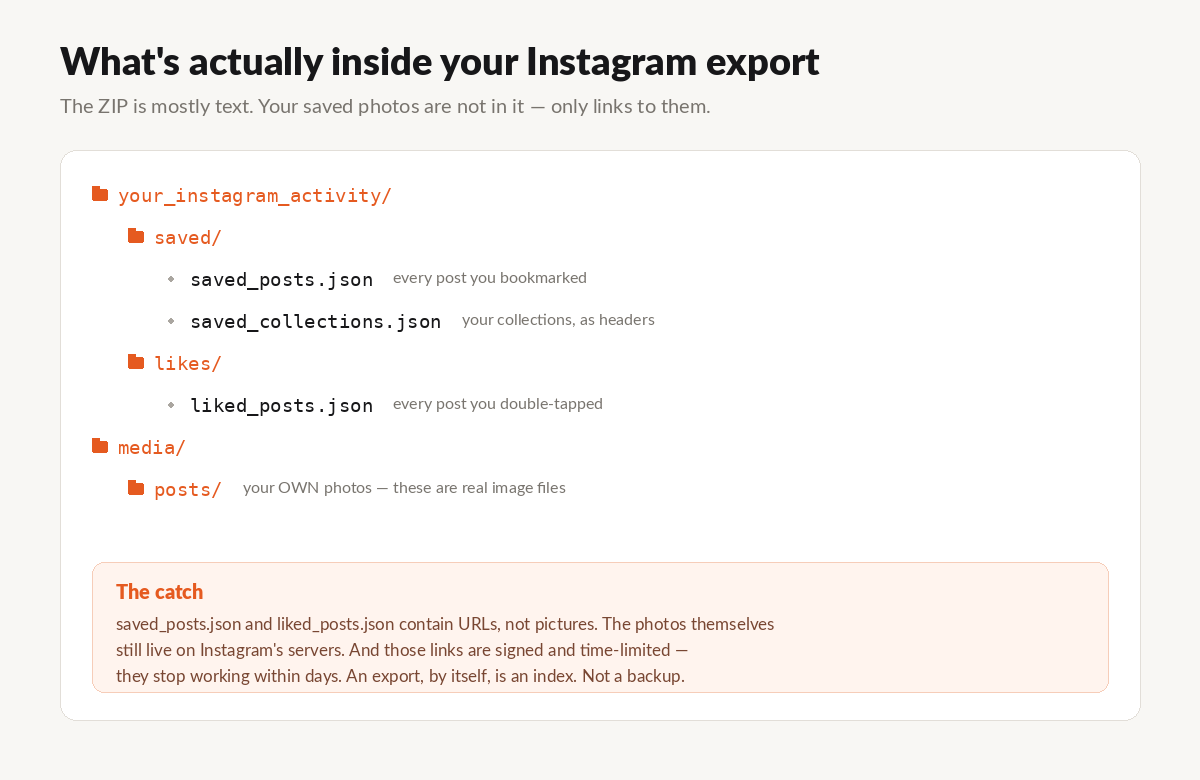
Those aren't pictures. They're links — thousands of URLs pointing at photos that still live on Instagram's servers.
And here's the part that turns a backup into a non-backup: those links are signed and time-limited. They stop working within days.
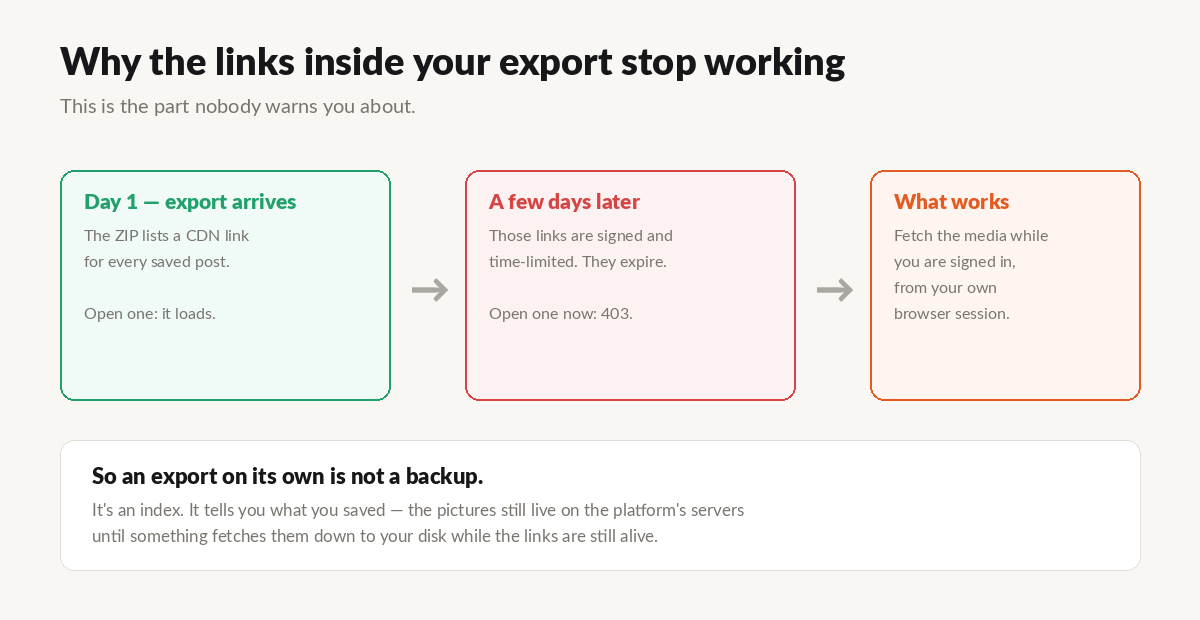
So if your backup plan was "download my data and put the ZIP on an external drive," you have backed up piles one — and made an index of piles two and three that will be worthless by the time you need it.
An export, by itself, is not a backup. It's a list.
Step 3: pull down what you saved and liked
This is the step that makes it a real backup, and it has to happen while the links are still alive.
Something needs to walk that list and fetch each photo and video, using the session you're already signed into — your own browser, your own login. Not a password handed to some website.
That's what I built UnplugMe for, because this is exactly the wall I hit with my own archive.
Drop the ZIP in and it finds everything you saved and liked, then downloads the real files to your hard drive — with your collections rebuilt as folders, so "Recipes" stays "Recipes" instead of becoming ten thousand unnamed files in one heap.
It runs in the background, because a big archive genuinely takes hours. The first 50 downloads are free with no account, so you can point it at your own export and confirm it does what I'm claiming.
Back up your Instagram → · Full export walkthrough →
How often to do this
Once, properly, and then whenever you remember.
The nice thing about doing it a second time is that a good tool skips everything you already have and only fetches what's new. So the first run is the long one; after that it's quick.
I do mine roughly once a year, usually after realising I've saved another few hundred things I'd be annoyed to lose.
What a backup can't save
Posts that were deleted. If the creator took it down, or the account is gone or now private, it's beyond anyone's reach. The platform no longer serves it, so no tool can retrieve it. This is the single best reason not to put this off — every year, a few more of your saves quietly rot.
Media inside DMs. The message text comes through. The images are patchy.
Stories you never saved. If it wasn't in your archive or your highlights, it's gone.
And if you are thinking of leaving
Then the order matters a lot more, because you can't request an export after the account is gone. I wrote that up separately: how to delete your Instagram account, and what you lose.
Back up first. Always.
UnplugMe is a personal data portability tool. It works with the official Instagram data export and your own signed-in session, and only ever downloads content you already saved or liked yourself. It is not affiliated with Meta.